
Your tournament Discord,on autopilot.
Registration, private group channels, room credentials, and result announcements — all handled by the Xtallet bot. Zero manual Discord work.
One setup.Runs your entire Discord.
From the first registration embed to the final result announcement — the Xtallet bot handles every Discord touchpoint.
Invite the bot
Click Add to Discord from the registration page. Grant 4 permissions: send messages, read history, application commands, embed links. Nothing else.
Configure registration
Set open and close dates, slot limit, players per team (4–8), and approval mode. Click Open Registration when ready.
Post the embed
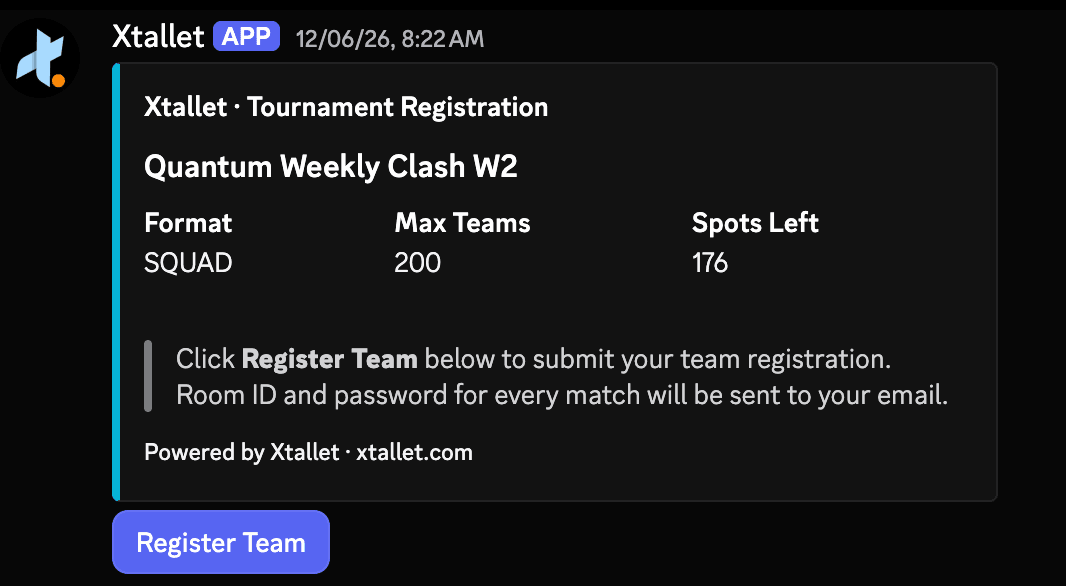
Run /postregistration <slug> in any channel. The bot posts a live tournament card with a Register Team button.
Players register
Players click Register Team in Discord, fill in team name, tag, email, WhatsApp, and player IGNs + BGMI UIDs. No Xtallet account needed.
Review registrations
Every submission appears instantly on your dashboard — labeled Discord or Link. Approve, reject, or remove. Manual mode lets you screen each entry before they get a slot.
Create group channels
After grouping, click Create Channels. The bot creates a private channel per group under a round category. Only that group's players can see it.
Send room credentials
Enter Room ID and password once. The bot delivers a formatted embed in each group's private channel, pinging every member of that group — email and in-app notifications go out simultaneously.
Announce results
Customize the leaderboard graphic — background, colors, logo, theme — then post directly to Discord. The bot sends it with the tournament name, round, match number, public standings URL, and pings your participant role.
Private channels created per group per round — auto-scoped to that group's players only. Room credentials deliver to the right channel in one click.
Everything Discord.Nothing manual.
Role assignment, channel creation, credential delivery, result announcements — the bot does it all, triggered from your Xtallet dashboard.
Participant role, auto-assigned
The moment a captain registers, the bot creates a tournament role — e.g. CCS Gladiator (tournament abbreviation + Gladiator) — and assigns it instantly. No role setup, no manual assignment. Ping only participants at any time without pinging your entire server.
Private group channels per round
After group distribution, one click creates the full channel set — a category named after the round (e.g. CCS Eliminator) with individual private channels per group: group-a-idp, group-b-idp, and so on. Only that group's registered players can see their channel. Repeat for each new round.
Formatted room credential delivery
Not a plain text drop. The bot sends a structured embed with round name, group, match number, map, IDP time, start time, Room ID, and password — delivered to every group's private channel simultaneously. Enter once in your dashboard, send once. All groups get it at the same moment.
Result announcements with custom graphics
After results are in, customize your leaderboard export — pick a background, accent color, logo, and theme. Post it to Discord in one click. The bot sends the styled standings graphic with the tournament name, round, match number, public standings URL, and pings your participant role.
Zero friction for players
Players never create an Xtallet account for Discord registration. They click Register Team, fill in the form, and they're in. The captain gets their participant role assigned automatically — all without leaving Discord.
Four commands.Full Discord control.
Invite the bot and run commands from your Discord server. The slug is your tournament's unique identifier — copy it from the registration page inside Xtallet.
bgmi-open-championship-s1-xk9p2m/postregistration <slug>Post the registration embed in a channel
/removeregistration <slug>Remove the registration embed from the server
/setresultschannel <slug> #channelSet the channel where round results are posted
/removeresultschannel <slug>Remove the results channel for a tournament
Questions aboutthe Discord bot?
Everything you need to know about automating your tournament Discord with Xtallet.
Still have questions? Reach out — we reply fast.
The Xtallet Discord bot automates tournament operations directly in your server — team registration embeds, participant role assignment, private group channel creation, room credential delivery, and result announcements. Everything is triggered from your Xtallet dashboard; the bot just executes on Discord.
No. Players never create an Xtallet account for Discord registration. They click Register Team in your server, fill in team name, tag, email, WhatsApp, and player IGNs + BGMI UIDs in a modal form, and they are registered. No login, no sign-up page.
Only 4 permissions: Send Messages, Read Message History, Application Commands, and Embed Links. No administrator access or any other permissions are required.
Both run in parallel and feed the same dashboard. Discord bot registrations are labeled "Discord", web link registrations are labeled "Link". You can also import teams directly from WhatsApp text, Excel, or CSV. All three methods work simultaneously.
When registration opens, the bot creates a role using the tournament abbreviation — for example, CCS Gladiator for Crown Championship Series — and assigns it to every registering captain instantly. No role setup needed. This lets you ping only registered participants without notifying your entire server.
After group distribution, click Create Channels. The bot creates a category named after the round (e.g. CCS Eliminator) with a private channel per group — group-a-idp, group-b-idp, and so on. Only players registered in that group can see their channel. Repeat the same click for each new round.
Enter the Room ID and password in your Xtallet dashboard and click send. The bot posts a formatted embed with round name, group, match number, map, IDP time, start time, Room ID, and password in each group's private channel — pinging every member of that group. Email and in-app notifications go out at the same moment.
After match results are submitted, go to Export Leaderboard, customize the standings graphic (background, accent colors, logo, theme), and click Post to Discord. The bot sends the styled image with the tournament name, round and match number, a link to the public standings page, and pings your participant role.
Yes. You can embed as many tournaments as you want in the same server — each one runs independently using its own unique slug. Post multiple registration embeds in different channels, set up separate private channel categories per tournament, and deliver credentials for each independently. The bot handles all of them in parallel without any crossover.
Connect Discord once.Run every tournament through it.
Registration, roles, private channels, room credentials, and result announcements — all from your Xtallet dashboard. No manual Discord work.