
Go Live.Real-time overlaysfor OBS & vMix.
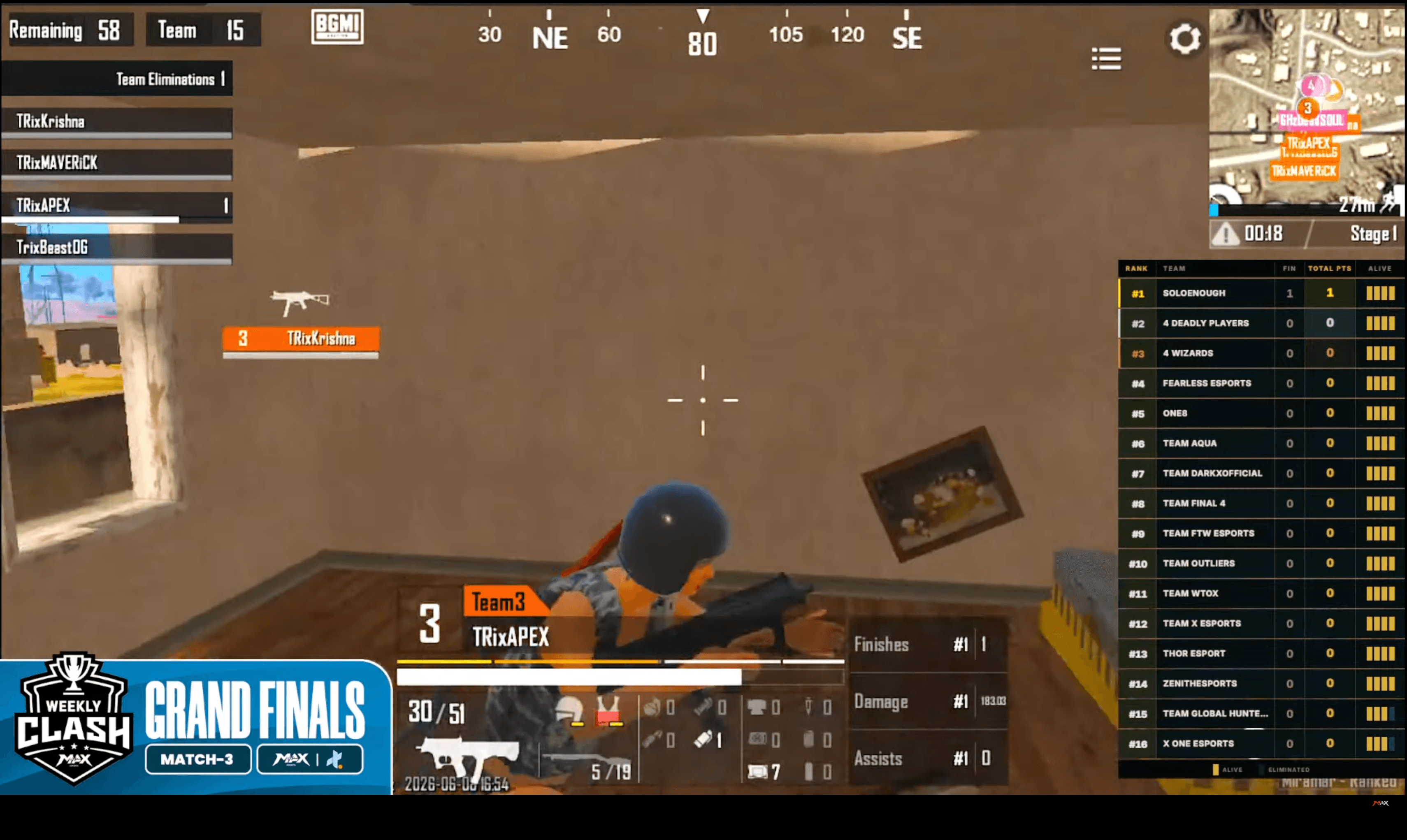
Browser source overlays that sync live as your team manages kills, alive counts, and rankings from the admin panel. Paste a URL into OBS or vMix and go live in seconds.
From setup to live in under 5 minutes
No plugins. No scripts. Just a URL.
Set up your tournament
Create your BGMI tournament, assign teams to match slots, and schedule matches.
Go live from admin
Toggle the match to "Live". Your team manages kills, alive counts, and rank in real-time.
Copy the overlay URL
From the Live Control panel or Overlay URL dialog, copy the browser source link.
Paste into OBS or vMix
Add a Browser Source in OBS or Web Browser input in vMix. Enable transparency. Done.
4 overlay types
Each is a standalone browser source URL — mix and match for your production layout.
Sidebar Leaderboard
420px real-time sidebar showing live rank, team name, kills, total points, and per-player alive bars. Updates under 1 second via Supabase Realtime.
Top Bar — Final 4
Built for the closing circle. When only 4 teams remain, the observer toggles "4-Team" mode — the sidebar slides away and a horizontal topbar takes over, showing each team's alive bars, kills, and win probability.
Elimination Card
A flash card that auto-appears when a team is eliminated mid-game — shows team name and kill count, then disappears after 3.5 seconds. Stops firing once the top 4 are reached.
Points Table
Full standings overlay with cumulative points, kills, and placement across all matches. Multiple templates to match your production. Cycling for large team counts. Auto-refreshes within 45s of each result.
Fully customizable. Sidebar, topbar, and elim card all support custom accent color and background — set directly from the Live Control panel and updates instantly on stream.
Add as a Browser Source in OBS
- Click + → Browser Source
- Paste your Xtallet overlay URL
- Set width to 1080px
- Enable Allow transparency
- Done — auto-updates live, no refresh needed
Add as a Web Browser Input in vMix
- Click Add Input → Web Browser
- Paste your Xtallet overlay URL
- Set width to 1080px and enable transparency
- Add to mix — updates live, no vMix scripting needed
Overlay templates
Pick a template for the points table that fits your production.
Match results fill themselves — overlay stays current automatically
Upload BGMI result screenshots. ZoneX AI reads ranks, slots, and kills in 10–20 seconds. Approve and the points table overlay refreshes within 45 seconds.
- Reads result & slot-assignment screenshots together
- Confidence scores flag anything to double-check
- Overlay updates the moment you approve
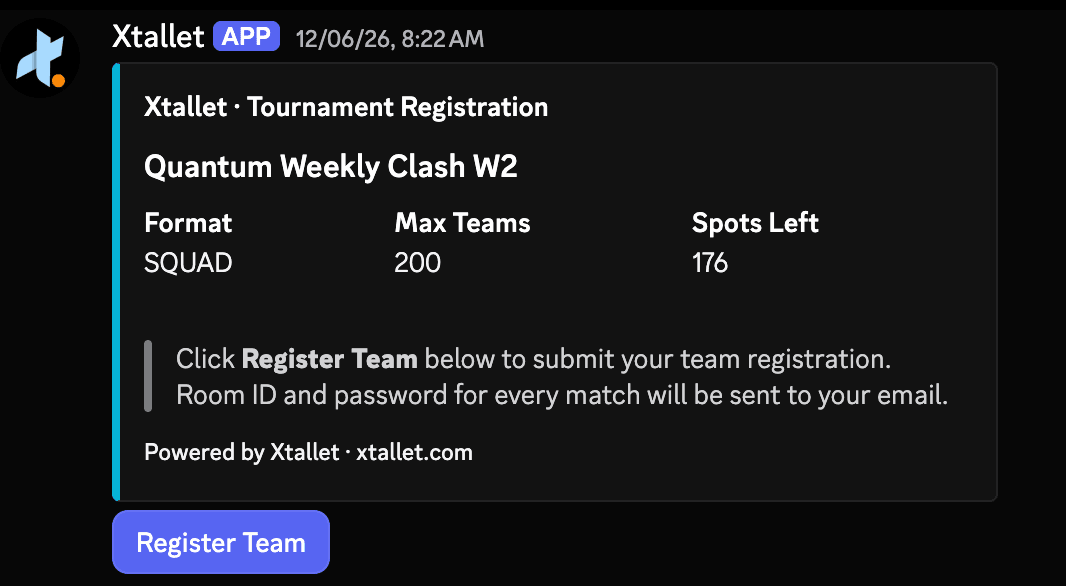
Team registration directly from Discord
Xtallet has a native Discord bot that lets players register their team without leaving Discord. Handles team name, player IGNs, and slot assignment — syncing directly to your dashboard.
- Players register via a Discord slash command or modal
- Duplicate registrations from the same account are blocked
- Registrations appear instantly in the organizer dashboard
Everything else that runs your tournament
The overlay is one part of a complete tournament management stack.
Team Registration
Public registration page with slot management, approval workflows, and Discord bot integration.
Brackets & Formats
Single elimination, double elimination, round-robin, Swiss, and custom group stages.
Live Leaderboard
Real-time standings pushed to the overlay and a public viewer page for spectators.
ZoneX AI
Upload BGMI screenshots → get auto-filled match results in 10–20 seconds via Google Gemini Vision.
Points Tables
Automated standings with kill points, placement points, and custom scoring rules.
Discord Bot
Native bot for team registration, slot confirmations, and tournament announcements inside Discord.
Questions? We've got answers.
Everything you need to know before going live with Xtallet overlays.
Still have questions? Reach out — we reply fast.
Yes — both. In OBS, add a Browser Source, paste the URL, set width to 1080px, and enable "Allow transparency." In vMix, add a Web Browser input with the same URL and enable transparency. No plugins, no scripting.
Changes from the admin panel push to the overlay via Supabase Realtime — typically under 1 second. As your team marks kills or eliminations, the sidebar reorders and updates live on stream.
The topbar is designed for the final-circle moment. When only 4 teams are alive, the observer switches to "4-Team" mode in the admin panel — the sidebar hides and a horizontal topbar appears showing each remaining team's alive bars, kills, and win probability.
Yes. Sidebar, topbar, and elimination card all have accent color and background color pickers in the Live Control panel. Change them mid-match and every connected source updates instantly — no URL change needed.
Yes. Once results are submitted — manually or via ZoneX AI — the points table overlay refreshes within 45 seconds. No export, no image swap, no manual trigger.
No. The sidebar, topbar, and elim-card URLs are per-match. For points tables, the URL is per-round — it pulls the latest standings automatically after each result is approved.
Ready to take your BGMI broadcast live?
Set up your tournament, paste a URL into OBS or vMix, and your live overlay is running — for free.